


To add images or entire categories to the content of Joomla! (Articles, etc.) you need the 'Content-Plugin JoomPlu'.
As another little helper, the 'Editorbutton JoomBu' plugin should also be installed. This plugin provides an editor button that makes it easier to insert images and categories.
You can find both plugins in the Downloads on our website.
Vorgehensweise:
- Installation of the two plugins in the extension manager of Joomla! or via the control panel of JoomGallery
- Activation of the two plugins in the extension manager of Joomla!
- Configuration of the JoomPlu plugin with regard to your own needs
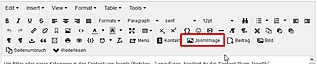
- Then appear in the Joomla! editor the button 'JoomImage'
- When you click the JoomImage button, a pop-up window with 4 tabs appears. These tabs offer the following functions:
1. Insert Image
Insert a single image into the content
In the upper part you determine which options are associated with the image
In the lower part you choose which picture should be inserted. You can search and filter for images.
With one click, the respective image is inserted into the content.
2. Insert Category
Insert a category (all images of a certain category) into the content.
First you can change the information about the design of the images (number of columns, etc.).
Then the category is selected whose images are to be inserted. With a click on the name the respective category is inserted.
3. Upload Image
Upload a new image
Here you can upload new images to an existing category
4. Create Category
Create a new category
Here you can create a new category.