


Once your extension has been accepted as an official extension, it will appear in the Official JoomGallery Extensions list inside the JoomGallery Control Panel and on this website.
JoomGallery does not maintain a database for this information. Instead, it fetches the update server XML of every listed extension and extracts the information directly from there. This means that you have full control on how the information is shown and you can update it anytime by updating your update server XML.
JoomGallery uses the standard Joomla! update server XML format. No custom XML format is required. If your extension already provides a proper Joomla! update server, you usually only need to make sure that the relevant fields are present and contain meaningful values.
Required XML elements
The following XML elements are read from your update server and displayed in the JoomGallery Control Panel. Missing elements will lead to empty table cells.
| XML element | Displayed as | Recommendation |
|---|---|---|
<name> |
Extension title | Use the official name of your extension. |
<description> |
Description | Keep this short (one or two sentences) and write it in English. It should explain what your extension does. |
<type> |
Small label below the title |
Use the Joomla extension type such as
component,
module,
plugin,
library,
package or
file.
|
<version> |
Version column | Specify the current released version. |
<infourl> |
"Visit Website" link | Link to a page describing your extension, its features, documentation or screenshots. |
<downloadurl> |
"Download" link | For free extensions this should point directly to the ZIP package. For commercial extensions this should point to the product or purchase page. |
<maintainer> |
Author | Your name or your company name. |
<maintainerurl> |
Link behind the author | Link to your personal or company website. |
Example
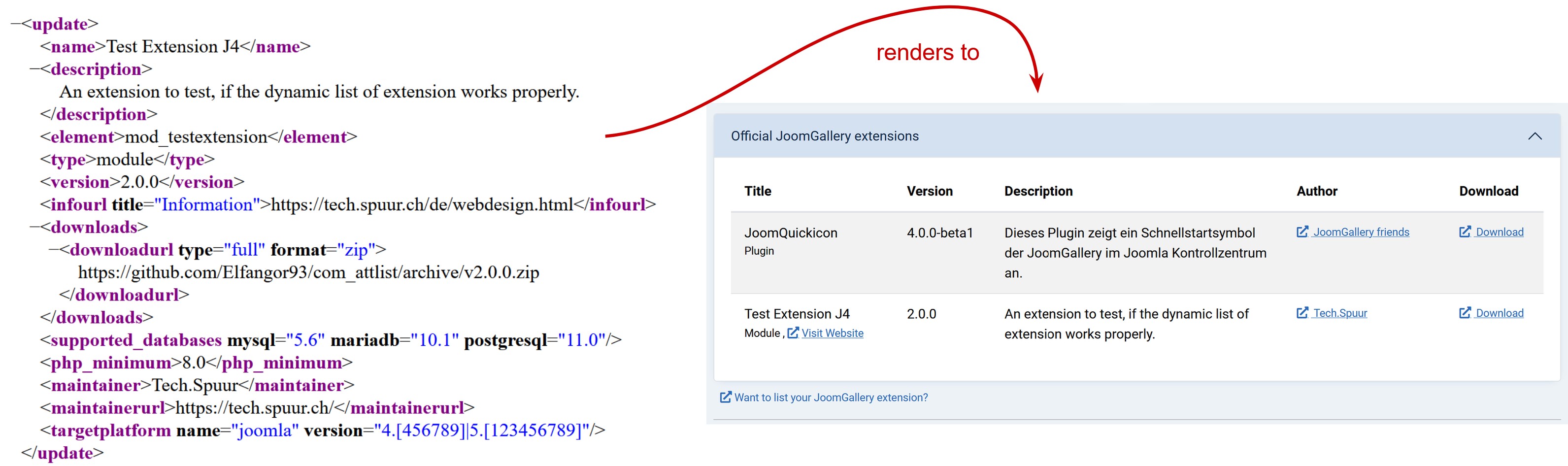
The following example shows a typical Joomla! update server XML. The highlighted elements are the information that JoomGallery displays in the extension list.
Official Joomla! documentation
The update server XML follows the official Joomla! specification. Besides the elements listed above, your XML should contain all information required by Joomla! to provide automatic updates.
Please refer to the official Joomla! documentation for a complete description of all supported XML elements and attributes: Joomla! Update Server Documentation
Best practices
- Keep the name short and recognizable.
- Write the description in English, as it is shown to all users.
- Always keep the version up to date.
- Make sure the download URL remains permanently accessible.
- Use an information page that explains your extension and provides documentation or support information.
- Keep your maintainer information current so users know where to obtain support.