


The migration from JoomGallery 3 to JoomGallery 4 brings some changes regarding URLs and file paths. Depending on the migration settings and configuration options, this may lead to incompatible URLs or broken image references. This article explains the differences and provides guidance on optimal configuration.
Inconsistencies in JoomGallery 3
Problematic Structure of URLs and Paths
JoomGallery 3 had inconsistencies between category title, alias, path, and URL for the category view. These arose due to the way these elements were generated.
Example Initial State in JoomGallery 3
As an initial state, we have created the following categories. This results in the following situation:

Kategorie-Manager
Die Kategoriestruktur, wie sie im Kategorie-Manager dargestellt wird.

Ordner-Struktur
Die Kategoriestruktur, wie sie im Filesystem als Ordnerstruktur dargestellt wird.

DB Tabelle
Die Kategoriestruktur, wie sie in der Tabelle #__joomgallery_catg angelegt wird.
We then upload a few images to the "Floor" category using the Drag'n'Drop uploader. The second image is given the title "Image_2" and is located in the "Floor" category. In the frontend, this results in the following URL for the detail view and the following file path for the image itself:
- Detail View (Joomla options: SEF URLs = Yes):
index.php/joomgallery/mycategory/subcategory/floor/image-2-20.html
index.php/joomgallery/image-20-orig.jpg
images/joomgallery/details/mycategory_31/subcategory_33/floor_35/image_2_20250222_2049074447.jpg
Bugs in JoomGallery 3
Bug 1: Alias and Path Inconsistency
Until version 3.7.0, the category alias was generated from the category path, while the path was based on the title and ID. Changes to the alias thus led to inconsistent structures. From version 3.7.0, the alias is generated from the title, and the path is then derived from this alias.
Bug 2: Alias Update When Moving
The alias of a category is composed of the aliases of the parent categories and is used for SEF URLs. If a category was moved, the alias should have adjusted accordingly – however, this did not happen automatically. Only with version 3.6.0 was a batch process added to update aliases retrospectively.
Maintenance Manager for Bug Fixes
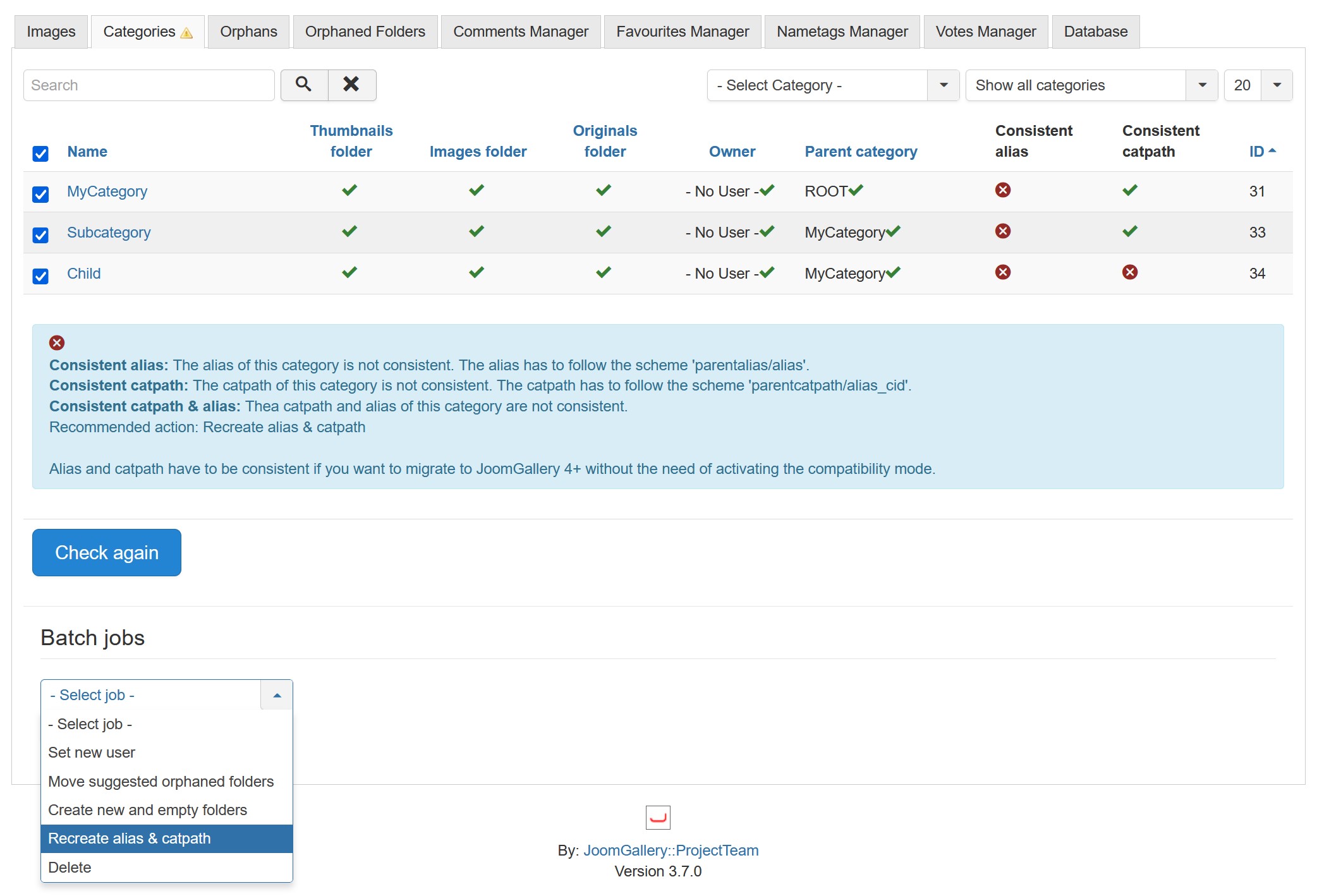
Since version 3.7.0, the maintenance manager offers a function to correct inconsistencies between title, alias, path, and ID. This lists inconsistent categories and automatically repairs them. Note: This adjustment can affect links and SEF URLs!
New Behaviour in JoomGallery 4
With JoomGallery 4, URLs and paths have been aligned with the Joomla core to ensure a uniform structure similar to Joomla articles.
Example Initial State in JoomGallery 4
For comparison, we create the exact same category structure with JoomGallery 4. This results in the following situation:

Kategorie-Manager
Die Kategoriestruktur, wie sie im Kategorie-Manager dargestellt wird.

Ordner-Struktur
Die Kategoriestruktur, wie sie im Filesystem als Ordnerstruktur dargestellt wird.

DB Tabelle
Die Kategoriestruktur, wie sie in der Tabelle #__joomgallery_catg angelegt wird.
We then upload a few images to the "Floor" category using "Multiple New". The second image is given the title "Image_2" and is located in the "Floor" category. In the frontend, this results in the following URL for the single image view and the following file path for the image itself:
- Detail View (Joomla Configuration: SEF URLs = Yes, JG Configuration: Remove IDs from URLs = Yes)
index.php/joomgallery/images/image-2.html
index.php/joomgallery/images/image-2.jpg?type=detail
images/joomgallery/details/mycategory/subcategory/floor/image-2_2_20250224_1400644915.jpg
Configuration Options
JoomGallery Configuration
- Use Real Paths: Enables system paths instead of SEF URLs for images.
- Routing: Determines how SEF URLs are structured (JG3-compatible mode available).
- Remove IDs from URLs: Allows URLs without IDs (performance is better with IDs).
- JG3 Compatibility Mode: Continues using the old folder structure with IDs from JG3.
Joomla Configuration
- Search Engine Friendly URLs: Enables or disables SEF URLs globally.
- Add URL Suffix: Adds file extensions to SEF URLs (relevant for images).
Migration Configuration
- Use Source IDs: Retains original IDs for consistency in links and paths.
- Use New Folder Structure: Removes IDs from folder names in the file structure.
Menu Entries Influence URLs
With the modern router, menu entries determine the URL structure. This method differs from the legacy router of JG3, which was more static. By default, the following menu entries are created when JG4 is installed:
- JoomGallery: Gallery view (alias "gallery")
- Categories: Category view (alias "categories")
- Images: User image list (formerly "User Panel", alias "images")
Conclusion
When switching to JoomGallery 4, it is important to understand the various options and pitfalls during migration and their impact on URL and path changes. Those who wish to maintain a JG3-compatible structure should enable the relevant options and activate compatibility mode. Those looking to transition to a Joomla-compliant structure should familiarise themselves with the modern router and its menu dependencies.